Someone walks in with a phone they bought from a stranger online. It powers on, the screen is perfect, the price was excellent. It will not take their SIM card.
This happens constantly, and the frustrating part is that “locked” can mean three completely different things. One of them we can fix in minutes. One of them nobody on earth can fix. And one of them means the phone will never work on a US network again, no matter what anyone tells you.
Here is how to tell them apart — before you hand over money.
The three kinds of lock
1. Carrier lock — usually removable
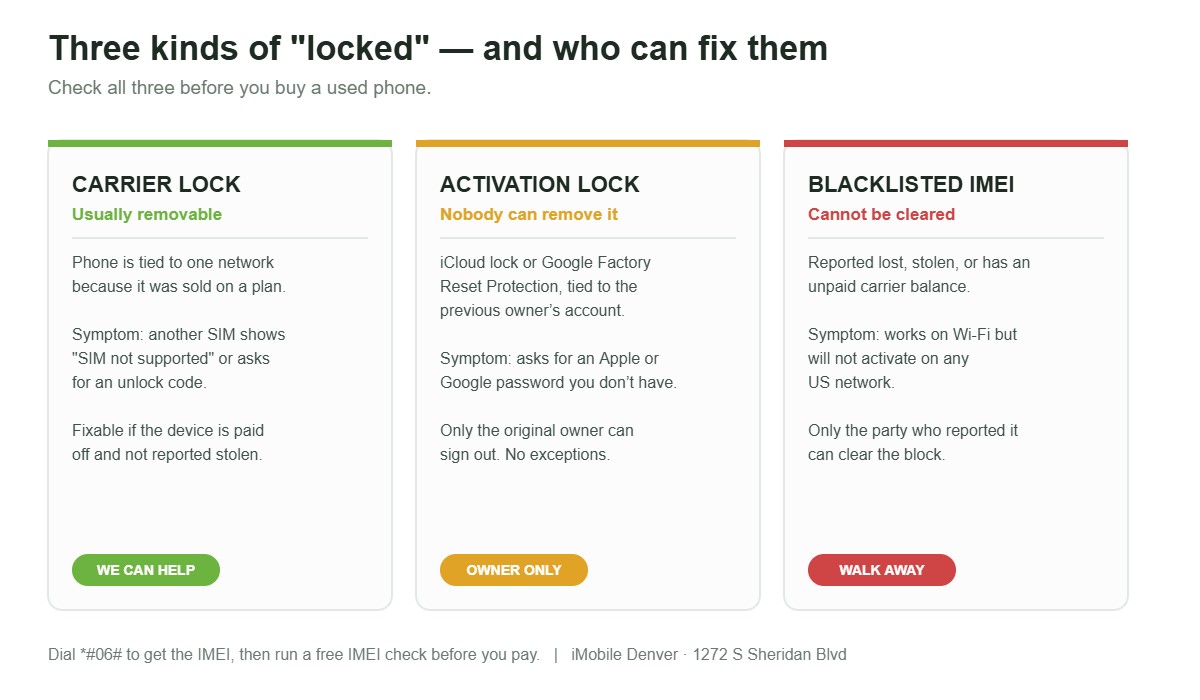
A carrier lock ties the phone to one network. It was sold on a contract or payment plan, and the carrier locks it until their conditions are met. Insert a SIM from a different network and you get a message asking for an unlock code, or simply no service.
This is the good one. In the US it is legal to unlock a phone you own, and carriers are required to unlock eligible devices on request. Eligibility usually means the device is fully paid off, the account is in good standing, it has been active for a set period, and it has not been reported lost or stolen.
We unlock carrier-locked iPhones at our Denver shop. Bring it in and we will check what is possible before you commit to anything.
2. Activation lock — nobody can remove it
This is Apple’s iCloud Activation Lock, or Google’s Factory Reset Protection on Android. It ties the device to the previous owner’s account, and it exists specifically to make stolen phones worthless.
Be very clear on this: no repair shop, no unlock service, and no software can legitimately bypass activation lock. Not us, not anyone. Anybody who tells you otherwise is either lying or doing something you do not want to be part of. The only fix is the original owner signing out of their account.
If you are buying used, this is the one that turns a phone into a paperweight.
3. Blacklisted — the phone is finished
A blacklisted IMEI has been reported lost, stolen, or has an unpaid balance on a carrier account. It is barred from activating on US networks. The phone works fine on Wi-Fi and looks perfect, which is exactly why it gets resold to people who do not check.
Unlike a carrier lock, a blacklist cannot be removed by a shop. Only the party who reported it can clear it.
How to check, in about three minutes
- Get the IMEI. Dial *#06# on the phone and it appears on screen. Any honest seller will give you this before you meet.
- Run it through a free IMEI checker to see whether it is blacklisted and whether it is carrier locked.
- Check activation lock properly. The phone should boot to the initial setup screen with no account attached. If it boots to someone else’s home screen, or asks for a password you do not have, stop.
- Put your own SIM in. If it says “SIM not supported” or asks for an unlock code, it is carrier locked — which may be fixable.
- Check the carrier matches your network bands. An unlocked phone can still get poor coverage if it was built for a different carrier.
A seller who refuses to share the IMEI has answered your question.
Why this matters more than people think
Denver has a large second-hand phone market, and most of it is fine. The problem is that the three locks are invisible from the outside. A blacklisted iPhone and a clean iPhone look identical in a parking lot handoff.
This is a large part of why buying from a shop costs a little more. When we sell a pre-owned device, the IMEI has already been checked, activation lock is confirmed clear, and the hardware has been tested. If something is wrong, there is somewhere to go. You can see what we currently have on our buy a device page, and we offer financing on new and used devices if you would rather spread the cost.
If you are on the other side of it and want to move an old handset on, we buy devices too.
If your own phone is carrier locked
Different situation, and usually a much better one. If it is your phone, you paid for it, and the account is settled, unlocking is normally straightforward. It is worth doing even if you are not switching networks — an unlocked phone is worth noticeably more when you sell it, and it lets you use a local SIM when you travel.
Bring it to our shop on Sheridan Blvd and we will tell you what is achievable. The estimate is free, and we will be straight with you if the answer is that it cannot be done.
While it is on the bench
Most phones that come in for unlocking have something else going on too — a battery on its last legs, a charging port that only works at an angle, a screen with a crack someone stopped noticing months ago. We handle iPhone repair, Samsung, every other smartphone brand, iPads, computers and laptops, game consoles and Apple Watch.
Find us at 1272 S Sheridan Blvd, Denver. We are closed Tuesdays; hours for the rest of the week are on our location page. Call Mehmet on (720) 224-5403, or Aria on (720) 319-9262 for service in Spanish. You can also get an instant quote before you come in.
Frequently asked questions
Is it legal to unlock my phone in the US?
Yes, unlocking a phone you own is legal, and carriers are required to unlock eligible devices. Eligibility generally means the device is paid off and was not reported lost or stolen.
Can you remove iCloud activation lock?
No, and neither can anyone else legitimately. Only the original owner can remove it by signing out of their Apple account. Be wary of any service claiming otherwise.
Can a blacklisted phone be fixed?
Not by a repair shop. A blacklist can only be cleared by whoever reported the device. It will still work on Wi-Fi, but not on a US carrier network.
How do I find my IMEI?
Dial *#06# on the keypad. It is also in Settings, and printed on the SIM tray or the original box.
Does unlocking a phone erase my data?
Carrier unlocking itself does not wipe your device, but back up before any service work as a matter of course.
Will unlocking void my warranty?
A legitimate carrier unlock does not. Every repair we complete carries a warranty, and we will explain what is covered before we start.